
If you’re a new owner saying, “Hello, any Sierra owners out there? Just got my Sierra last week and very happy with the cart—but how do I turn off the backup buzzer?” — you’re not alone.
The Sierra is a feature-packed low-speed vehicle (LSV), and most owners love the smooth ride, modern styling, and electric performance. But let’s be honest—that reverse buzzer can be loud, especially in quiet neighborhoods or private property settings.
In this guide, we’ll walk you through:
- Why the backup buzzer exists
- Whether you can legally turn it off
- Safe ways to disable or reduce it
- Warranty considerations
- Other helpful Sierra owner FAQs
Let’s dive in.
Why Does the Sierra Have a Backup Buzzer?
The Sierra includes a reverse alarm for safety reasons.
Because it qualifies as a low-speed vehicle (LSV), it must meet certain safety guidelines. Backup alarms are commonly installed to:
- Alert pedestrians
- Warn children or pets nearby
- Reduce parking lot accidents
- Improve neighborhood safety
Electric vehicles are very quiet. Without a buzzer, people may not realize you’re backing up.
So while it may seem annoying, it’s actually there to prevent accidents.
Can You Legally Turn Off the Backup Buzzer?
Before you grab tools, here’s something important:
If Your Sierra Is Street-Legal and Registered
Altering federally required safety equipment may violate regulations depending on your state or local laws.
If you use your golf cart:
- On public roads
- In HOA communities
- In gated neighborhoods
- On resort properties
You should check local regulations before disabling any safety device.
If You Use It on Private Property Only
If the cart is used strictly on private land (farms, large properties, private trails), you may have more flexibility.
Pro Tip: When in doubt, consult your dealer first to protect your warranty.
How to Turn Off the Sierra Backup Buzzer (Step-by-Step Options)
There are a few possible methods, depending on how the buzzer is wired in your specific model year.
Option 1: Check for a Settings Menu (If Equipped)
Some newer LSVs include controller-based settings.
Steps to check:
- Turn key to ON (without driving).
- Navigate the digital display.
- Look for:
- Reverse alarm settings
- Sound settings
- System configuration
If no menu exists, it’s likely hardwired.
Option 2: Locate the Reverse Buzzer Module
Most Sierra models use a small, round or rectangular buzzer unit mounted:
- Under the rear body panel
- Near the motor controller
- Beneath the rear seat area
Steps:
- Turn off cart completely.
- Disconnect the battery (important for safety).
- Lift rear seat or access rear compartment.
- Locate small black buzzer device with two wires.
- Identify connector plug.
Often, it’s a simple plug-in unit.
Option 3: Disconnect the Buzzer Plug
If it’s a plug-style connection:
- Carefully unplug the connector.
- Secure loose wiring with zip ties.
- Reconnect battery.
- Test reverse gear.
This is reversible, meaning you can plug it back in anytime.
Option 4: Install an Inline Switch (Best Long-Term Option)
Instead of permanently disconnecting it, many owners install:
- A small inline toggle switch
- Mounted discreetly under seat
This allows you to:
- Turn buzzer ON for street use
- Turn buzzer OFF for private property
This approach keeps flexibility and is often the smartest modification.
Option 5: Sound Dampening Instead of Disabling
If you don’t want to fully disable it, you can:
- Add foam padding around buzzer housing
- Relocate buzzer slightly inward
- Install resistor to reduce volume (advanced users only)
This reduces noise without removing the safety feature entirely.
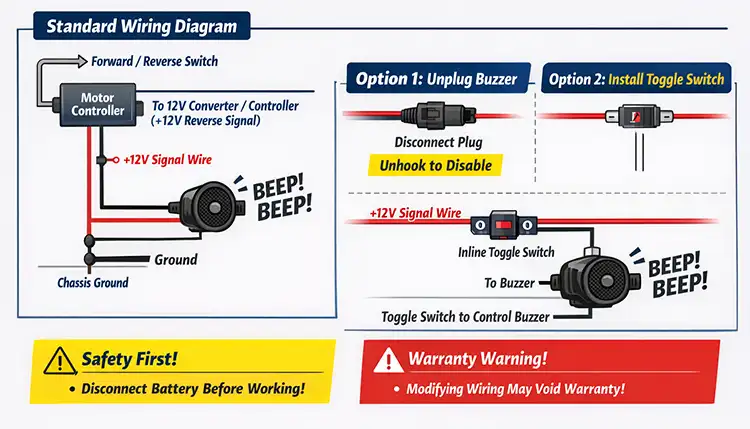
Important: Will This Void My Warranty?
Here’s the big concern.
Modifying factory wiring may:
- Void electrical system warranty
- Affect controller coverage
- Create service complications
Before making changes:
✔ Contact your authorized Sierra dealer
✔ Ask whether unplugging the buzzer affects coverage
✔ Document the modification
If purchased through a dealer, they may even offer a compliant solution.
Why Dealers Recommend Caution
Dealers often recommend keeping the buzzer intact because:
- Liability concerns
- Insurance implications
- Community regulations
- Future resale value
Remember, future buyers may prefer factory configuration.
Common Sierra Owner Questions
In many areas, yes. LSVs must meet safety standards, and backup warnings may be part of compliance depending on local laws.
Yes. Sound dampening or installing a resistor can reduce volume, but this should be done carefully to avoid electrical issues.
Typically under the rear seat compartment near the controller or motor wiring harness.
No, if done correctly and safely. However, improper wiring modifications can cause electrical faults.
Some dealers may assist, depending on local laws and company policy. Always check first.
Electric carts are nearly silent. Manufacturers intentionally make the alarm noticeable to improve pedestrian safety.
Potentially. Future buyers may prefer factory safety features intact.
Final Thoughts for New Sierra Owners
First off—congrats on your new Sierra. It’s exciting getting a new ride, and the Sierra has quickly built a strong reputation among owners.
If the backup buzzer feels excessive, you have options:
- Check settings first
- Consider reversible unplugging
- Install an inline switch
- Talk to your dealer
The key is balancing convenience with safety and legal compliance.